
Starting the TalkBox.Mom Signature Box Program
Congratulations on choosing to talk in another language with your family!
With TalkBox.Mom, you’ll start using another language together the same day you start.
We’ll help you add the language to your real life, empower your kids to use it with you, and skip years of studying before actually using the language.
Instead of spending long stretches studying first, TalkBox.Mom keeps your practice focused so your family can spend more time using the language together in real life.
Practice Sessions are short and focused, so you can spend less time in the app and more time actually using the language together in real life.
If your family already knows more of the language or wants to move faster, you can complete multiple Practice Sessions in a day.
If you want a slower pace, you can spread them out and spend more time using each new phrase before adding another one.
You don’t need to master everything before moving forward. The program is designed to help your family keep using what you’ve practiced while continuing to add more language over time.
After you order
You can start before your physical Box even arrives.
1. Download the TalkBox.Mom app
📱Apple App Store | 📱Google Play Store | 🖥️Desktop
Log in with the email address connected to your TalkBox.Mom purchase, then set up your Fluency Family with the family members who will be practicing together.
Your Fluency Family lets the app guide your family through Practice Sessions together and gives each child a chance to connect the Focus Phrase to a situation so they can practice using it in a meaningful context.
Where do I start in the TalkBox.Mom app?
2. Complete your first Practice Session
For your very first Practice Session, we recommend starting with:
“I’m hungry.”
Choose your Focus Phrase
Go to Practice → Choose a Focus Phrase.
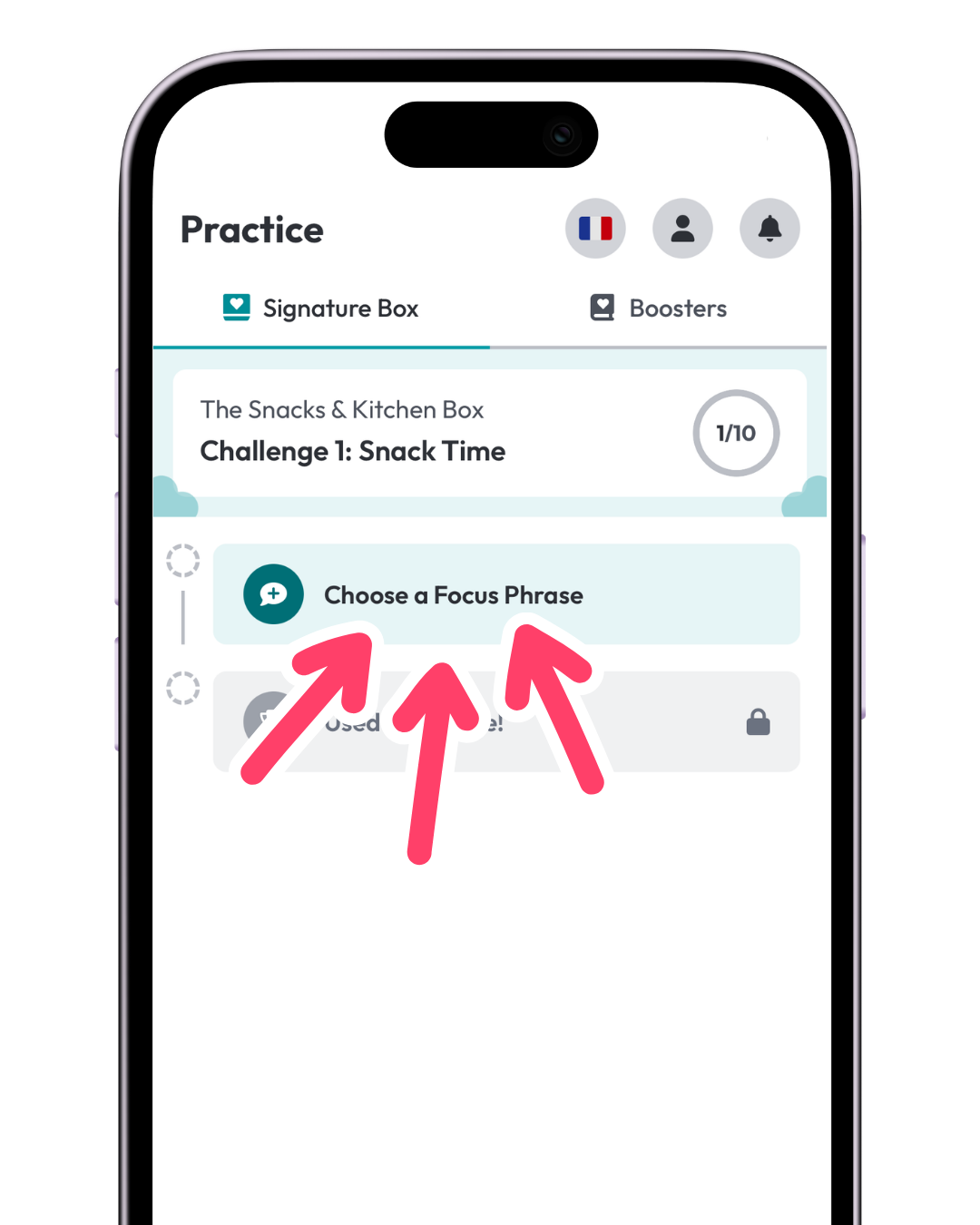
Your Focus Phrase is the phrase your family is going to practice together and begin using in real life.
You do not need to choose a whole list of phrases at once.
Starting with one phrase keeps your family focused enough to actually begin using it instead of collecting more language than you can remember to use.
How do I choose a Focus Phrase?
Practice your Focus Phrase
The app will guide your family through:
- Practice with the Audio
- Practice in a Situation
- Practice with Emotions
These steps are doing more than helping you pronounce the phrase.
Practice with the Audio gives everyone the same native-speaker model. Your child also sees you practicing with the audio, so you’re practicing together instead of your child feeling like they’re being tested by you.
Practice in a Situation helps your child connect the phrase to a context. Your child comes up with the situation first, then you model using the phrase in their situation before they practice it. That context gives their brain something to connect the language to later.
The situation can be realistic or completely ridiculous—the phrase just needs to make sense in it.
Practice with Emotions gives your family another memorable repetition without making everyone concentrate so hard on saying the phrase perfectly. You can even choose Your choice! and use a funny voice, character, or impersonation.
Finally, your family will make a Game Plan for using the phrase in real life. Decide when, where, or during what activity you’ll use your Focus Phrase. This gives your child a specific moment to watch for so they can recognize the opportunity and use the phrase themselves.
All of these steps work together to prepare your child to use the phrase in real life.
How do Practice Sessions work?
Use your Focus Phrase in real life
Once your Practice Session is finished, follow your Game Plan and look for—or create—a moment to use your Focus Phrase in real life.
If your phrase is “I’m hungry,” you might use it before a snack, lunch, or dinner. If the opportunity doesn’t naturally come up, you can create one.
Practicing gets your phrase ready. Using it in real life is what moves you forward.
How do I use a Focus Phrase in real life?
After your Box arrives
1. Put up your Challenge #1 Language Guide
Put the guide somewhere your family will naturally see it.
For the first Box, we recommend putting it in your kitchen.
Your Language Guide is not something you need to sit down and study. It gives your family a visual cue to keep using the language as you move through your normal day.
2. Use your guide to remember your Focus Phrases
When the situation on the guide comes up in real life, use the language with your family.
You can also let your kids notice phrases and remind the family when they see an opportunity to use one.
This helps shift the language from something Mom has to manage into something the whole family can participate in using.
3. Use Recent when you need the audio again
Once you’ve practiced a Focus Phrase, you can quickly find it in Recent.
Use Recent when you know what you want to say but need help recalling the words or how the phrase sounds.
That lets your family keep the conversation going instead of feeling like you have to remember everything perfectly before you can use the language.
Where can I find phrases I practiced recently?
Complete your First Challenge
1. Complete 10 Practice Sessions in the same Challenge
Each Challenge includes 10 Practice Sessions.
You’ve already completed Practice Session #1. For Practice Sessions #2–10, you’ll continue the same rhythm:
- Warm up with the Focus Phrases you already practiced in that Challenge
- Choose your next Focus Phrase
- Practice it with the Audio, in a Situation, and with Emotions
- Make your Game Plan
- Use your Focus Phrase in real life
This rhythm helps your family keep earlier phrases active while adding new, connected language a little at a time.
Before Practice Sessions #2–10, your Warm Up brings the Focus Phrases from your current Challenge back to the front of your mind so they’re easier to keep using as you add something new.
After you use your new Focus Phrase in real life, your next Practice Session unlocks. Keep going until you complete all 10 Practice Sessions in the Challenge, then move forward to the next Challenge.
2. Move on to your Next Challenge
After 10 Practice Sessions, move forward to the next Challenge.
Unlike a traditional program, you are not trying to learn every phrase in the Challenge before moving on.
As you can see on your Challenge Folder, TalkBox.Mom is designed to have your family practice a smaller group of connected phrases, use them in real life, and then move forward while those phrases keep coming back through Reviews.
Moving forward expands the situations where your family can use the language.
Your completed Challenge becomes a Review Set, and under Review in the app, those phrases continue coming back in a rolling weekly schedule.
When you return to that Challenge on a later Tour, the topic and language patterns are already familiar. That makes it easier to add another layer of phrases and begin using those new phrases in real life with more confidence.
Why do we move on after 10 Practice Sessions?
We recommend moving forward to your next Box rather than immediately completing multiple Tours of the same Box just to practice every phrase.
Moving forward helps your family add language for more parts of everyday life while Reviews keep the phrases you already practiced active.
Later, when you Tour that Box again, you’ll return with a much stronger foundation. The topic and patterns are already familiar, so new phrases connect to language your family is already using and are easier to remember and bring into real life.
After you complete all 9 Boxes, you can continue touring back through your Boxes and choosing new Focus Phrases.
How do I switch Challenges or start another Tour?
What if I’m using TalkBox.Mom for high school?
High school students use the same TalkBox.Mom method, but they can move through the program more quickly and complete additional Tours.
For the modified high school track, students can:
- Tour through the first three Boxes three times
- then Tour through the next three Boxes three times
- then Tour through the last three Boxes three times
This lets students deepen their language within familiar topics while continuing to expand into new areas.